Endpoint & Auth
POST /api/public/v1/assigned_companies/{assigned_company_id}/invoices
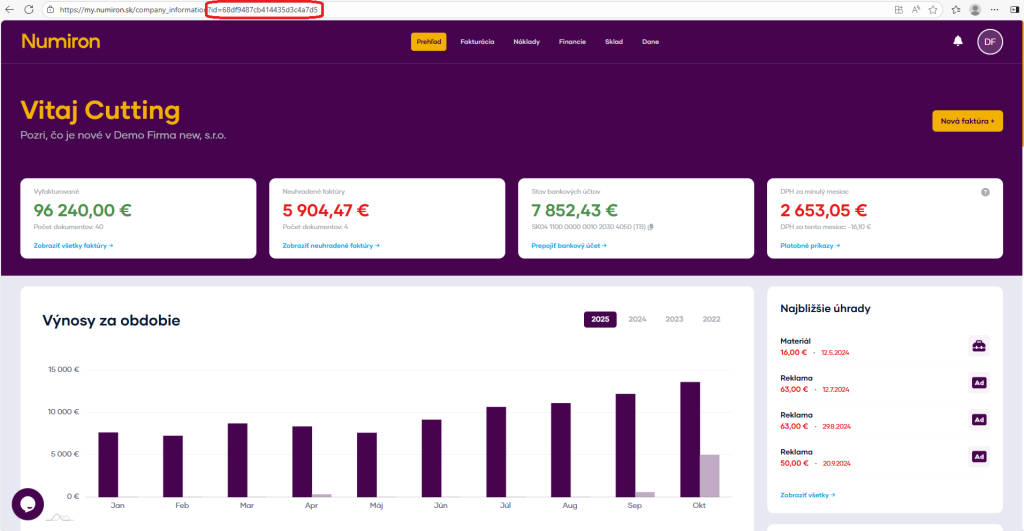
How to get {assigned_company_id} please refer to this guide .
Headers:
Authorization: Bearer
Accept: application/json
Content-Type: application/json
Date format: ISO-8601, e.g. 2025-06-30T00:00:00.000+00:00Currency: ISO-4217, e.g. EUR
Field Type Required Description Example Enum / Note address_purchaser string ✅ Customer's address - street and number. Main street 5address_supplier string ✅ My address - street and number. Main street 5city_purchaser string ✅ City of the customer. Bratislavacity_supplier string ✅ My place. Bratislavaclient_emails array List of client emails (recipients). Each item has email: string (e.g. client@client.com). constant_symbol string Constant document symbol. 1234country_purchaser string ✅ Country of customer (ISO 3166-1 alpha-2). ENcountry_supplier string My country (ISO 3166-1 alpha-2). ENcreation_date string (datetime) ✅ Date of issue. 2025-08-26T07:59:41.920ZISO-8601 currency string ✅ Currency (ISO 4217 code). CZKdelivery_city string City of delivery address. Bratislavadelivery_country string Country of delivery address (ISO-2). ENdelivery_method string ✅ Method of delivery. in_personby_courier, electronically, in_person, own_transportdelivery_name string Name/contact at the delivery address. Milan Malinovýdelivery_street string Street and delivery address number. Main street 5delivery_zip string The postcode of the delivery address. 12345dic_purchaser string the customer's VAT number. 1234567890dic_supplier string My VAT number. 1234567890exchange_rate number ✅ Foreign currency exchange rate against EUR. 25.123icdph_purchaser string VAT number of the customer. SK1234567890icdph_supplier string My VAT number. SK1234567890ico_purchaser string Customer ID. 12345678ico_supplier string My ID. 12345678invoice_lines array ✅ Document items (see table below). language string ✅ Document language. ENDE, EN, ENmessage string Main text (after „We invoice you“). under contract...name_purchaser string ✅ Name of the customer. Company s.r.o.name_supplier string ✅ My name. Company s.r.o.note string Internal note to the document. The customer wanted gift wrapping.order_number string Order number. 123ABCoss boolean OSS (One Stop Shop) mode. falseparagraph_purchaser string Paragraph of the customer's VAT registration. 4paragraph_supplier string Paragraph of my VAT registration. 4payment_method string ✅ Method of payment. bank_transferadvance_payment, bank_transfer, by_compensation, card, cash, cash_on_deliverysave_client boolean Save the client to the directory. falsesignature boolean Signature/stamps on PDF. falsezip_purchaser string ✅ the postcode of the customer. 12345zip_supplier string ✅ My zip code. 12345delivery_date string (datetime) ✅ Date of delivery (DUZP). 2025-08-26T07:59:41.920ZISO-8601 delivery_note boolean Also create a delivery note. falseexpiration_date string (datetime) ✅ Due Date. 2025-08-26T07:59:41.920ZISO-8601 iban string (IBAN) ✅ IBAN of the document. SK0000000000000000000000Valid IBAN invoice_number string ✅ Document number. 20250001Unique in the series variable_symbol string ✅ Variable symbol. 1234123477
Items
Field Type Required Description Example Enum / Note activity string Activity (for the dashboard „Sales by activity“). Act 1amount number ✅ Quantity of the item. 1VAT number ✅ VAT rate in %. 23given_obligation string Tax mode for 0% line. transfer_15exemption_from_tax_liability, transfer_15, transfer_16, triangular_trade, Exceptiondelivery_type string Type of performance. servicese.g. goods, services, ... department string Centre (for the dashboard „Sales by Centre“). Depot 1discount_one_row number ✅ Discount on the item in %. 10desired_total number ✅ The final amount of the item. 1.23Usually with VAT idx string ✅ Unique index of the item within the document. 1itemInfo string ✅ Text/title of the item. applesmeasureUnit string Unit of measurement. ksorder string Contract (for the dashboard „Sales by Contract“). Order 1
Note: For desired_total, the system will calculate unit prices and rounding according to the current rules.
cURL example (template)
curl -X POST \
Expected answer
„abc123“
Possible answer codes:
Code Description 201 Created. 400 Bad request. Document number already exists or pairing to documents failed. 401 Not logged in. 403 Not allowed. 422 Input validation error.