Do you have any questions? Write to info@numiron.sk

Numiron support

Numiron Support & FAQ

Group 957 (1)
integrate

Personal tax return

home

Getting Started

pie-chart-analysis

Views

Frame 7718

Invoicing

bar-chart-analysis

Cost

Frame 7715

Finance

user

Settings

percent-badge

Data

user

Subscription

Frame 7718

Integrations

Contact us if you haven't found the answer

Mon - Fri from 08:00 - 16:00
Numiron

/

Support

/

/

How to get {assigned_company_id} in Numiron

How to get {assigned_company_id} in Numiron

1 min.

Written by

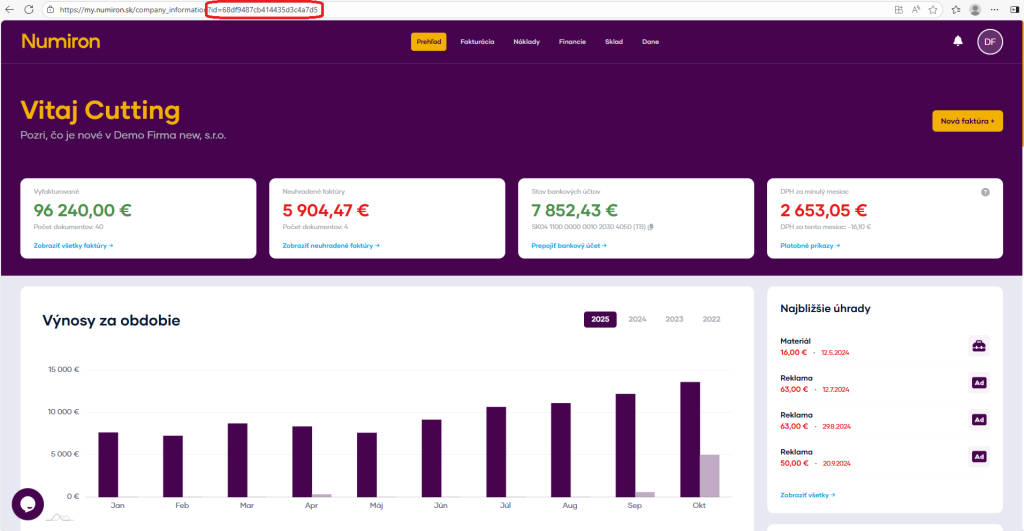
  1. Log in to Numiron and select the entity for which {assigned_company_id} is required. 
  1. After logging in, the system will redirect you to the overview page. The {assigned_company_id} is found in the URL. 
  1. The URL can look like this:  
    https://my.numiron.sk/company_information?id=68df9487cb414435d3c4a7d5 
    The value after the id= parameter is your {assigned_company_id} 
     
    In this case it is 68df9487cb414435d3c4a7d5. 
assigned company id
  1. To create an invoice for this company, endpoint will:  
    POST /api/public/v1/assigned_companies/68df9230cb414435d3c48bef/invoices 

Contact us if you haven't found the answer

Mon - Fri from 08:00 - 16:00